
set up once, grow every day
Connect PilotDeck to your site
Step by step guides for linking your search data, your website and your social accounts, so PilotDeck can research, write and publish for you. Start with Search Console, the only connection PilotDeck requires.
- Search Console access is read-only
- Drafts wait for your approval by default
- Every credential in the guides is masked
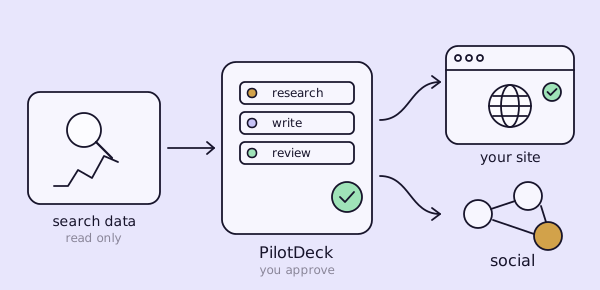
Set up in three steps
Each step is a short guide with real screenshots. Do them in order, or jump to the one you need.
- RequiredConnect Search ConsoleGive PilotDeck read-only access to your rankings, clicks and indexed pages. It is the only connection PilotDeck needs.Open the guide
- Pick oneChoose how content reaches your siteClone, CMS or Copy: decide who puts approved articles on your site, and what access that needs.Compare the modes
- OptionalShare what you publishConnect Publer, Buffer or Postiz so approved posts reach your social accounts as drafts.See social tools
Browse by topic
Everything you can connect, grouped by what it does.
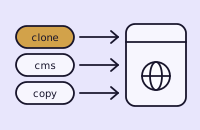 Publish modesChoose how approved content reaches your site: we manage it end to end with Clone, publish to your CMS, or copy it yourself.3 of 3 guides published
 Search & analyticsConnect the data sources that feed the PilotDeck engine. Google Search Console is the only required connection.1 of 4 guides published
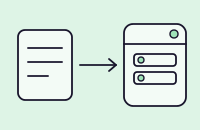 CMS connectionLink your website platform so approved articles are created in your CMS without copy and paste.7 of 7 guides published
 Social connectionsConnect a social scheduling tool so PilotDeck can share what you publish, and choose which accounts each site uses.4 of 5 guides published
Three ways to publish
Review comes first in every mode. What changes is who puts the article on your site.
CloneFully managedWe update your site's code, apply technical fixes and deploy. Needs repository and hosting access.CMSAuto-publishArticles go straight into your CMS as drafts or live. Fixes and new pages stay guided.CopyNo access neededYou paste each approved article into your own site. Nothing is automatic.
Popular guides
The setup guides people open first.
Stuck, or your platform is not listed?
Every guide ends with troubleshooting. If you are still blocked, our team can help you finish the setup.